
Prepare Your GST/HST Return
Use Solarium's Sales Tax Report to get your GST/HST return numbers line by line, fix what isn't counted yet, and download a CSV before you file with the CRA.
Solarium’s Sales Tax Report lays out your GST/HST return the way the CRA form numbers it. You see what you owe or get back, what could still change it, and every entry behind each line. Then you file with the numbers in hand.
Before You Start
- You need a Canadian business in Solarium. The report is on every plan.
- Check your tax setup in Settings, then General: your Province, GST/HST Filing Frequency and Fiscal Year End. These set your filing periods. See Set Up Canadian Tax Details.
- Book or reject what’s in Review for the period. Unbooked transactions aren’t counted.
- Filing rules and deadlines are in our handbook entry on filing a GST/HST return.
Steps
1. Open The Sales Tax Report
Go to Reports and click the Sales Tax Report tab. Solarium opens on your most recent filing period that has ended.
2. Pick The Filing Period
Use the period menu in the header. It lists the quarter (or month, or year) you’re in, marked (In Progress), then the ones before it. Riio Systems Inc. files quarterly and picks Jul 1 to Sep 30.
3. Read The Answer
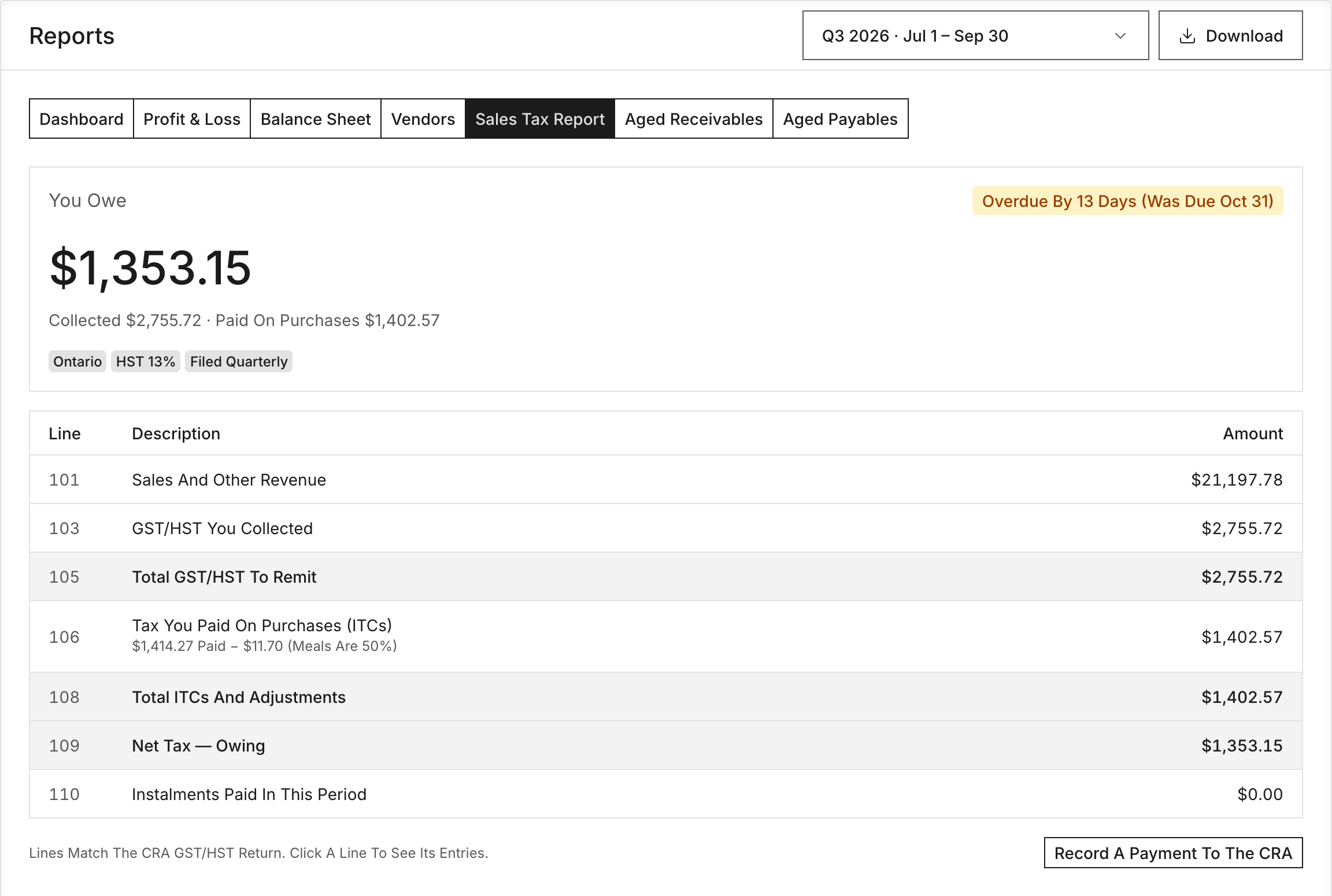
The card at the top says You Owe, You’ll Get Back or Nothing To Pay, with the amount. Under it you’ll see what you collected and what you paid on purchases. A badge shows the due date, like “Due Oct 31 · In 12 Days”. The period you’re still in carries an in-progress badge, so you know it isn’t ready to file.
4. Clear The Warnings
Solarium flags anything that could still change your return:
- Transactions Aren’t Booked Yet. Click Review Them, then book or reject each one.
- Receipts Show No Tax. Check whether you were charged GST/HST. If you were, add it on the transaction so you can claim it.
- Stripe Charges May Include GST/HST That Isn’t Split Out. If your prices include tax, split it on each charge.
- Bank Deposits Look Like Stripe Payouts. Book each one as a transfer from your Stripe account, so sales aren’t counted twice.
5. Check Each Line
The table follows the CRA return:
- 101 Sales And Other Revenue
- 103 GST/HST You Collected
- 105 Total GST/HST To Remit
- 106 Tax You Paid On Purchases (ITCs)
- 108 Total ITCs And Adjustments
- 109 Net Tax
- 110 Instalments Paid In This Period
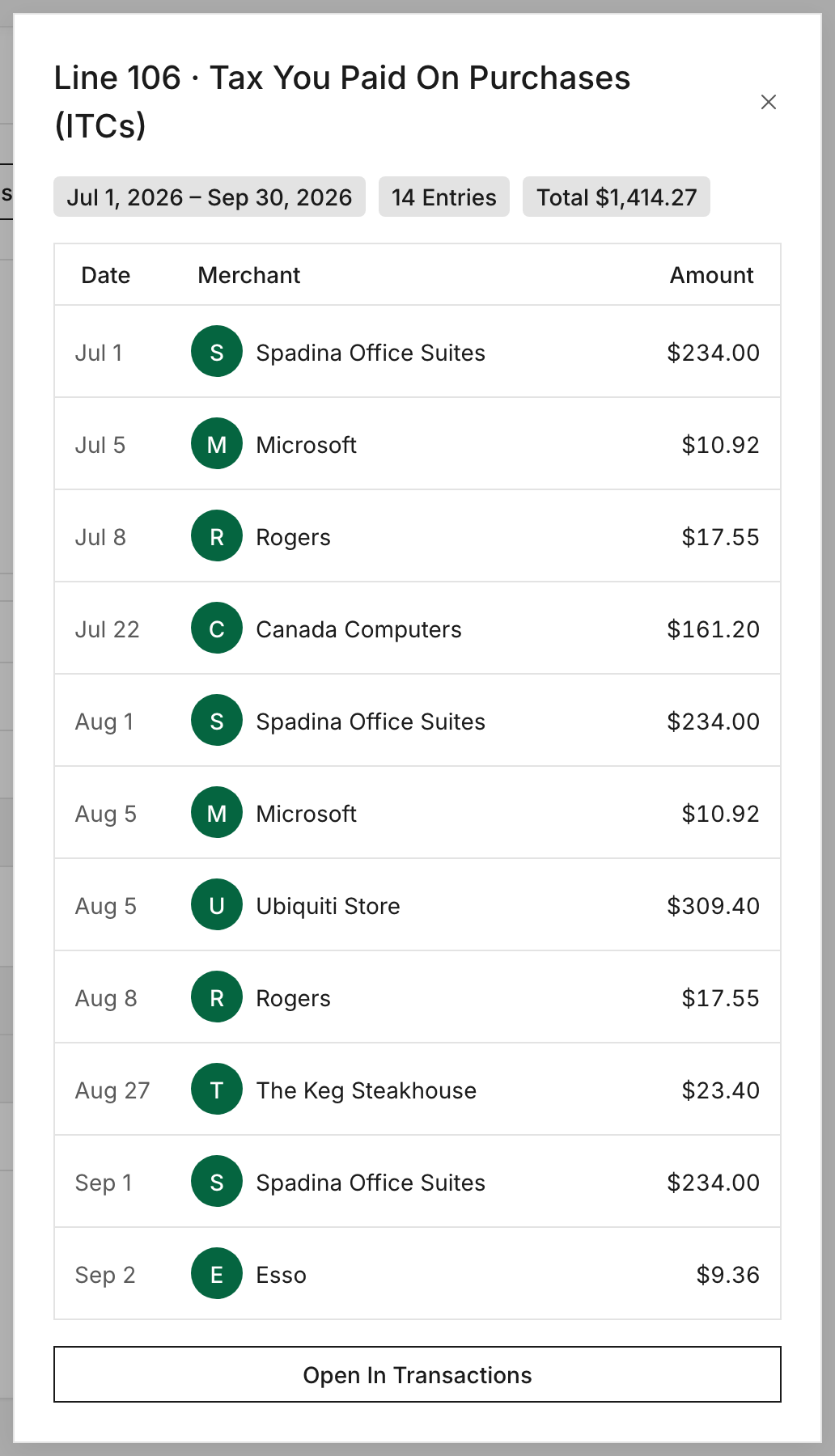
If you paid instalments, Solarium adds 113A with the balance after them. Click any line to see the entries behind it.
6. Download The Return
Click Download and choose the CSV option for the GST/HST return. It covers the filing period you picked, with every line from 101 to 113A and the accounts behind them. The Excel option includes it too, alongside every other report.
7. File And Pay
File the return with the CRA yourself or through your accountant. Once you’ve paid, record it in Solarium. See Record A Payment To The CRA.
What Happens Next
Solarium keeps the report live. If you book a late receipt or fix a transaction in a past period, the numbers update. If the books for that period have been closed, Solarium asks you to confirm before a change goes through, with a Change a Filed Return? check.
Troubleshooting
- “No Tax Accounts Configured.” Set your province in Settings, then General.
- The due date looks wrong. Check your GST/HST Filing Frequency and Fiscal Year End in Settings, then General.
- The CSV option is missing. It only appears on the Sales Tax Report for Canadian businesses.
- Line 110 is zero but you paid an instalment. Record it with Record A Payment To The CRA and pick Instalment.
Ask Your AI
The sales tax report is in both Claude and ChatGPT once you’ve connected Solarium.
- “What do I owe the CRA for last quarter?”
- “Which transactions are still in review for July to September?”
- “Show me what makes up line 106 this quarter.”
Common Questions
Does Solarium File My GST/HST Return? +
No. Solarium prepares the numbers line by line in the shape of the CRA return. You or your accountant file it with the CRA.
Why Is Line 106 Lower Than The Tax I Paid? +
Meals and entertainment are only 50% claimable, so Solarium takes half of that tax off and shows the math under the line.
Where Do PST And QST Show Up? +
Below the GST/HST return, in their own sections. They're filed separately with the province, so Solarium keeps them apart.
What If My Stripe Prices Include Tax? +
Stripe doesn't send the tax on a charge, so Solarium counts it all as sales unless you tell it otherwise. Open Stripe in Settings, Integrations, choose Change accounts and tick My Stripe prices include GST/HST.