
Set Up Your Canadian Tax Details
Set your province, GST/HST number, filing frequency, QST and fiscal year end in Solarium, so tax codes, invoices and your GST/HST return come out right.
Solarium uses a few tax details to pick the right GST/HST on every transaction, print your numbers on invoices, and build your return for the right periods. Setting them takes a couple of minutes, and you usually only do it once.
Before You Start
- These settings are on every plan, for a business set up in Canada.
- You need to be the owner or an admin of the business in Solarium.
- Have your GST/HST registration number handy, and your QST number if you’re registered in Quebec.
- Know how often you file with the CRA and when your fiscal year ends. Not sure? See the handbook on filing frequency and fiscal year end.
Steps
1. Open General Settings
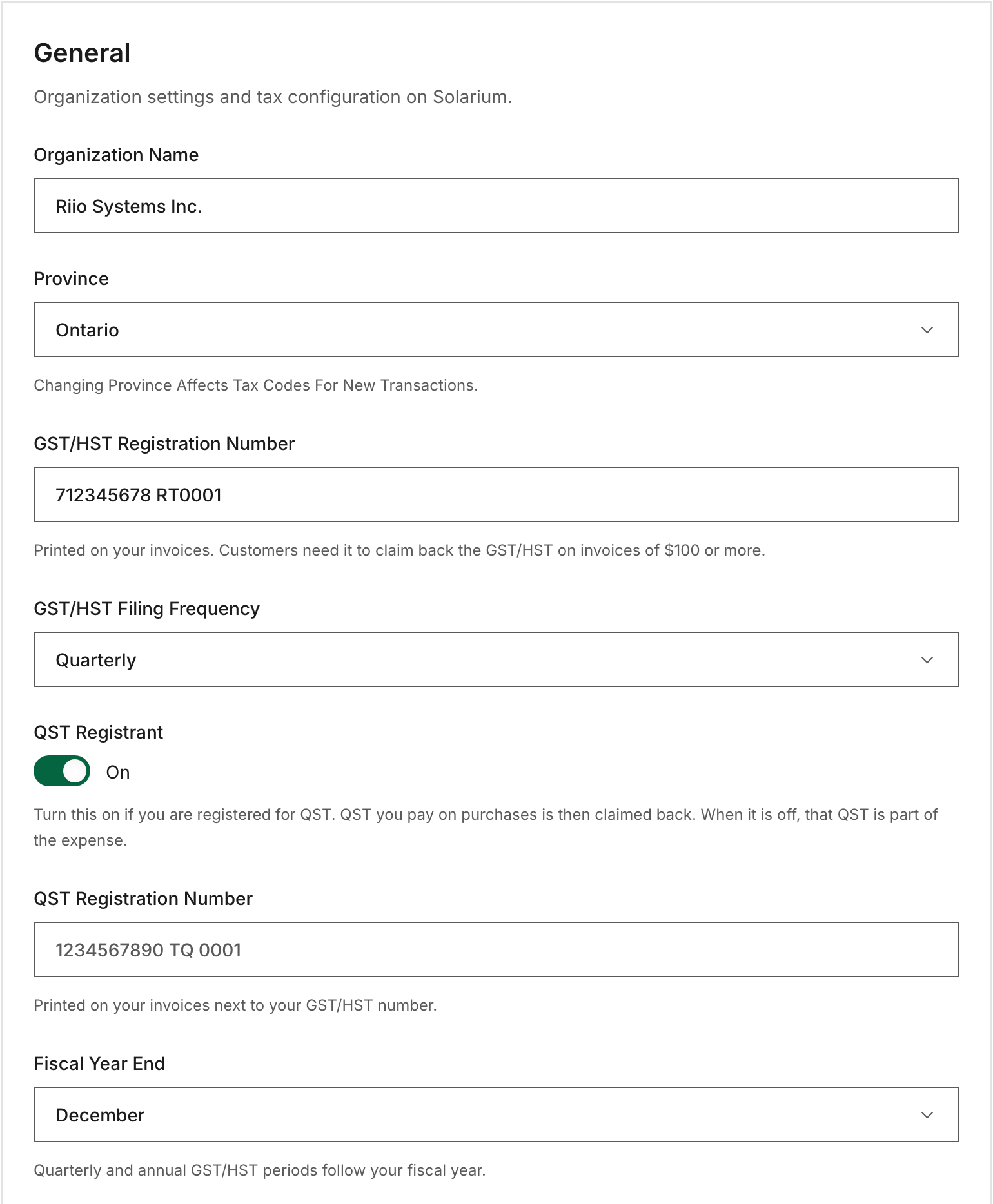
Click Settings, then General in the settings menu. A Canadian business sees its tax fields here. You picked your province and filing frequency when you signed up, so check that they’re still right.
2. Set Your Province
Under Province, pick where your business is. Solarium saves it as soon as you choose. Changing it affects tax codes for new transactions, not ones already booked. Riio Systems Inc. picks Ontario, so its usual tax is HST at 13%.
3. Add Your GST/HST Registration Number
Type it under GST/HST Registration Number and click away from the field to save. You can type it with or without spaces. Solarium writes it the standard way, like 123456789 RT0001.
Solarium prints this number on every invoice. Your customers need it to claim back the GST/HST on an invoice of $100 or more, under the CRA’s input tax credit rules.
4. Pick Your Filing Frequency
Under GST/HST Filing Frequency, choose Monthly, Quarterly or Annual. This sets the periods and due dates on your Sales Tax Report.
5. Set Up QST If You’re In Quebec
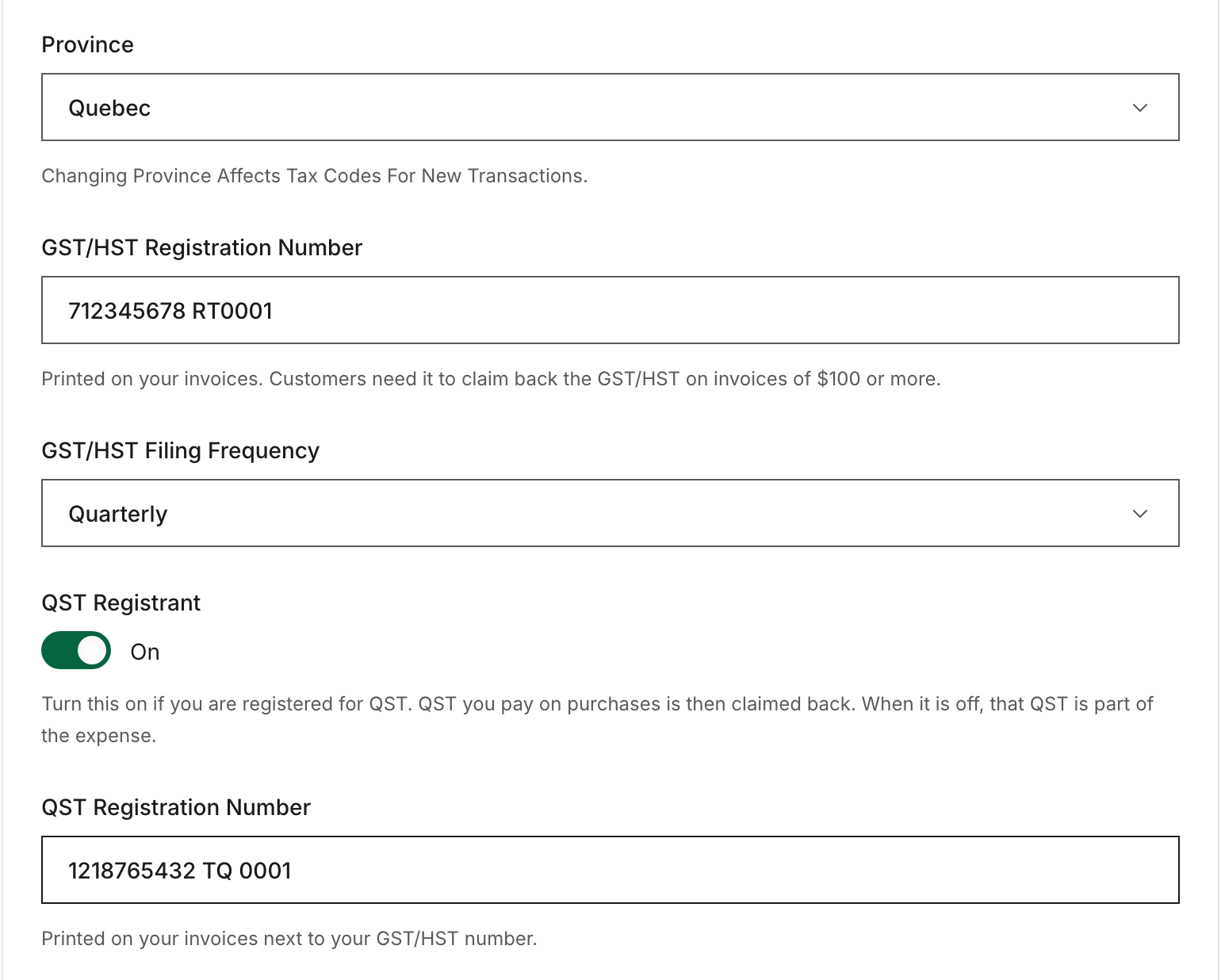
For a Quebec business, a QST Registrant switch appears. Turn it on if you’re registered for QST. QST you pay on purchases is then claimed back. When it’s off, that QST is part of the expense.
Once it’s on, add your QST Registration Number, like 1234567890 TQ 0001. It prints on your invoices next to your GST/HST number. A number in another format still saves, with a warning to double-check it.
6. Set Your Fiscal Year End
Under Fiscal Year End, pick the month your fiscal year ends. Quarterly and annual GST/HST periods follow your fiscal year.
What Happens Next
Solarium uses these details everywhere:
- New transactions get the right tax for your province, and your input tax credits are tracked.
- Every invoice prints your GST/HST number, and your QST number if you have one. Invoice tax follows your customer’s province. See Create And Send An Invoice.
- The Sales Tax Report uses your filing frequency and fiscal year end for its periods and due dates. See Prepare Your GST/HST Return.
Troubleshooting
- “A GST/HST number is 9 digits, then RT and 4 digits, like 123456789 RT0001.” Check for a missing digit or a different program code, like RC or RP. Only the RT number goes here.
- “Must Be Owner Or Admin.” Your role is Bookkeeper. Ask the owner or an admin to make the change.
- The QST switch isn’t showing. It only appears when your province is Quebec.
- The Sales Tax Report says “No Tax Accounts Configured.” Set your province here first.
Ask Your AI
In Claude, connected to Solarium, your AI can add or change your GST/HST and QST numbers. It shows you the change first. The other settings on this page are changed in the app.
- “Add my GST/HST number, 123456789 RT0001, to my invoices.”
- “What tax numbers print on my invoices right now?”
Common Questions
Where Do I Find My GST/HST Number? +
It's your 9-digit business number followed by RT and 4 digits, like 123456789 RT0001. You got it when you registered for GST/HST. Our handbook entry on GST/HST registration explains where it comes from.
Does Solarium Check My GST/HST Number? +
Solarium checks the format, 9 digits then RT and 4 digits, and writes it the standard way. It doesn't look the number up with the CRA.
I'm Not In Quebec. Do I Need The QST Setting? +
Usually not. The QST Registrant switch only shows for a Quebec business, or one that's already turned it on.
Can A Bookkeeper Change These Settings? +
No. Only the owner or an admin of the business in Solarium can change the province, tax numbers, filing frequency and fiscal year end.