
Record A Payment To The CRA
Book a GST/HST return payment or an instalment you sent the CRA, so your GST/HST payable clears and instalments show on line 110 of Solarium's report.
Once you’ve paid the CRA, Solarium needs to know. Recording the payment clears the GST/HST you owed, or keeps an instalment on record so your next return counts it. It takes a minute from the Sales Tax Report.
Before You Start
- You need a Canadian business in Solarium. It works on every plan.
- Have the payment details ready: the amount, the date it left your bank and which bank account paid it.
- Know what it was for. A Return Balance pays a return you filed. An Instalment is a prepayment toward a return you haven’t filed yet. The handbook covers GST/HST instalments if you’re not sure you need them.
- Using QuickBooks Online? Record a return balance in QuickBooks instead. You can still record instalments here.
Steps
1. Open The Sales Tax Report
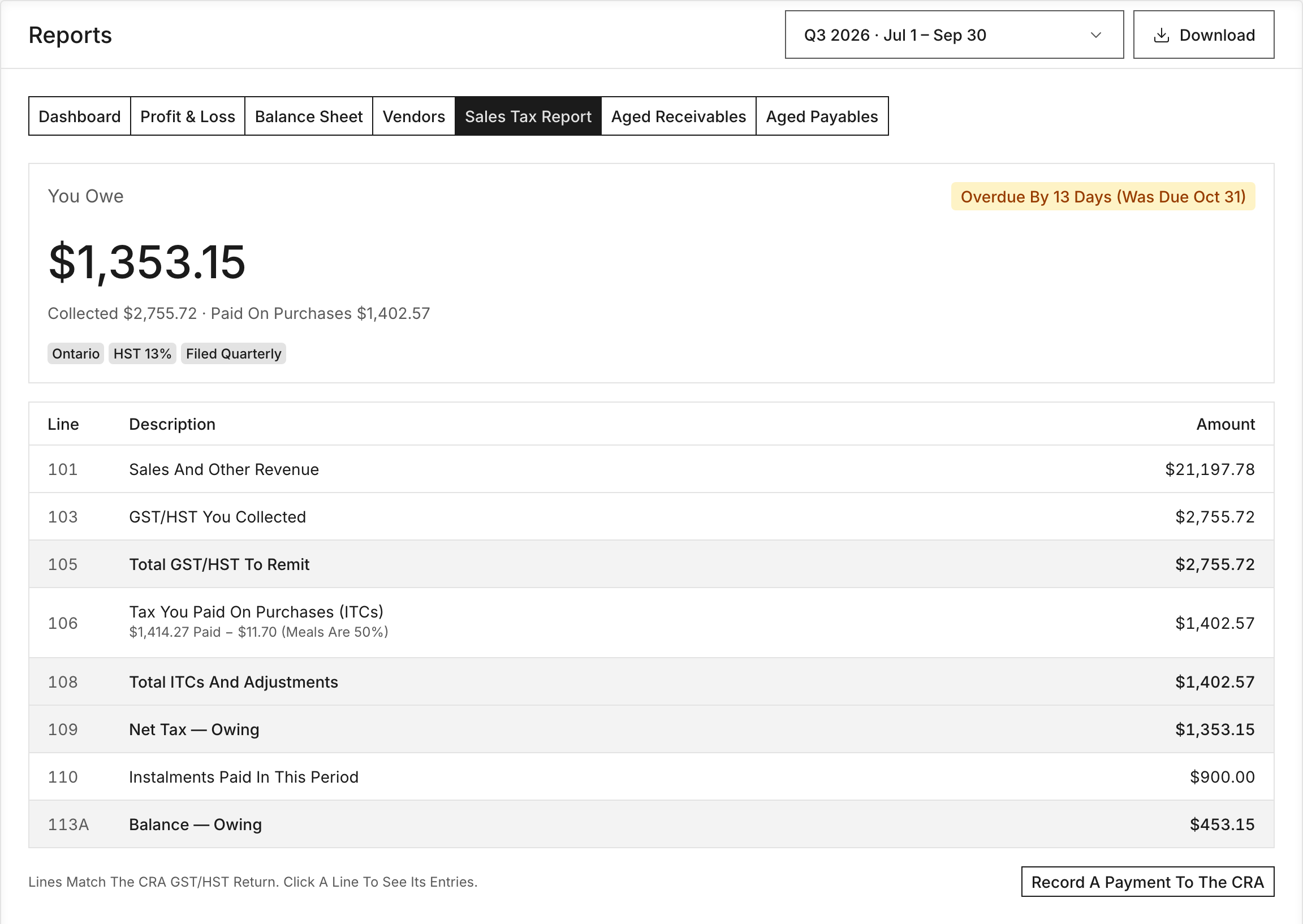
Go to Reports and click Sales Tax Report. Pick the filing period you’re paying for in the period menu.
2. Click Record A Payment To The CRA
Under the return lines, click Record A Payment To The CRA. A dialog opens. Solarium fills in the Amount with what the period says you owe, less any instalments already paid. Change it if you paid something different.
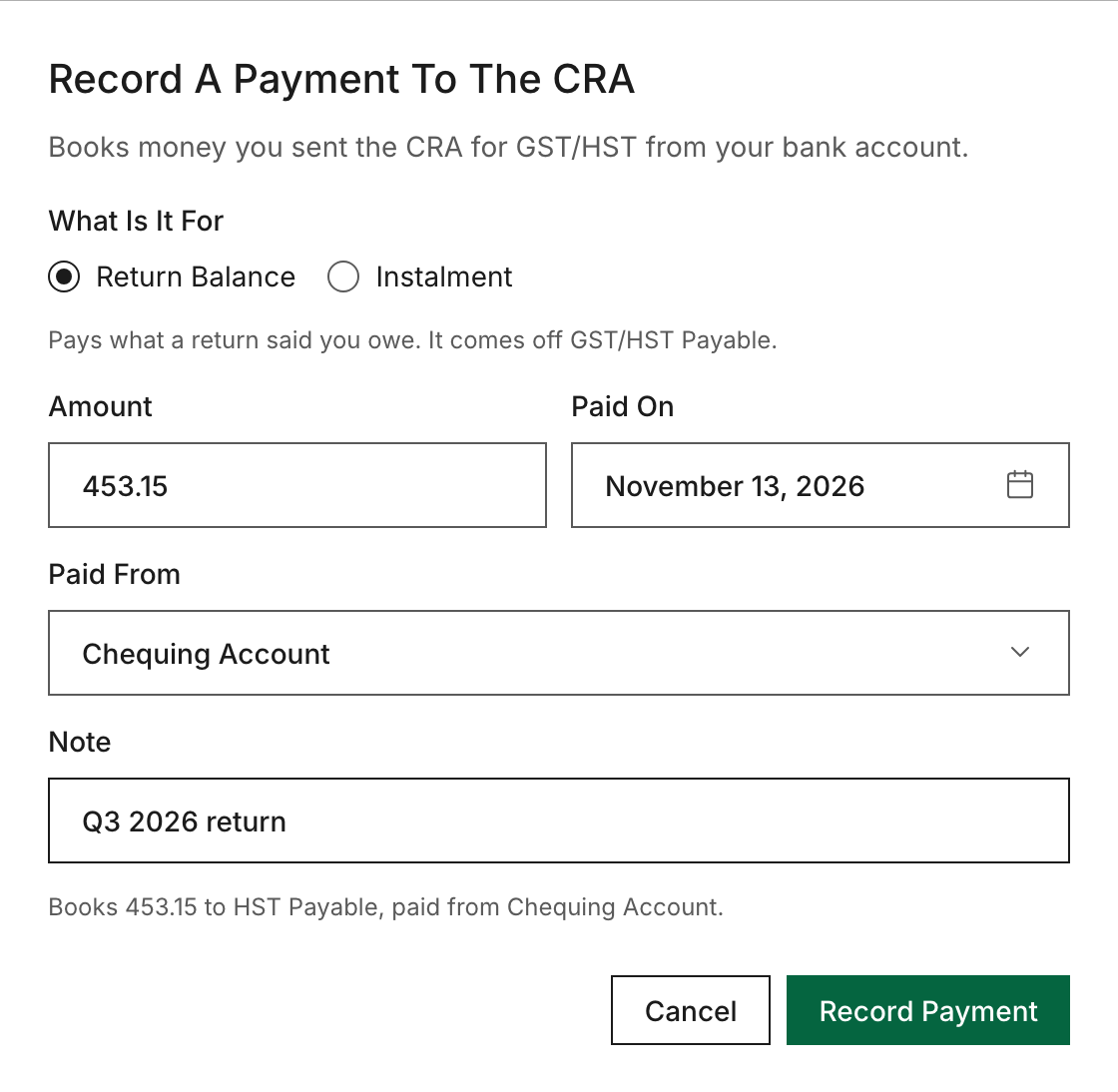
3. Choose What It’s For
Under What Is It For, pick Return Balance or Instalment. Riio Systems Inc. paid its third-quarter return of $2,140.00, so it picks Return Balance.
4. Fill In The Details
- Amount: what you paid.
- Paid On: the day it left the bank.
- Paid From: pick the bank account.
- Note: optional, like “Q3 2026 return”.
5. Check The Preview And Record It
Before anything is saved, Solarium previews the entry in one line, like “Books 2140.00 to GST/HST Payable, paid from Chequing.” For an instalment, it books to GST/HST Instalments instead, and creates that account the first time. Click Record Payment.
What Happens Next
Solarium posts one confirmed entry from your bank account:
- A Return Balance lowers your GST/HST Payable. It’s a settlement, so it doesn’t change the tax on any return.
- An Instalment shows on line 110 Instalments Paid In This Period of the period you paid it in. Solarium adds line 113A with the balance left after instalments.
If you use QuickBooks Online, the entry and any new instalments account sync there. At year end, apply your instalments against GST/HST Payable with a journal entry.
Troubleshooting
- “Record this payment in QuickBooks (Taxes, then Record payment).” Your business is connected to QuickBooks, so a return balance is recorded there. It arrives in Solarium with the nightly sync.
- “There’s No GST/HST Payable Account To Pay Down.” Check your province in Settings, then General, or ask the Solarium team to set up your tax accounts.
- “Paying The CRA Only Applies To Canadian Businesses.” Your AI said this because the business is set up outside Canada. The button only appears for Canadian businesses.
- The same withdrawal shows up in Review. Your bank feed brings in the payment too. Don’t book it a second time. Reject that copy in Review so the payment isn’t counted twice.
- Record Payment stays greyed out. Pick a bank account and enter an amount above zero.
Ask Your AI
In Claude, connected to Solarium, your AI can record CRA payments for you. It shows you the entry first and only books it when you say yes. This isn’t in the ChatGPT app yet.
- “I paid the CRA $2,140 from chequing on October 28 for my Q3 return. Record it.”
- “Record a $600 GST/HST instalment paid on September 30.”
- “Apply this year’s GST/HST instalments against GST/HST Payable.”
Common Questions
What's The Difference Between Return Balance And Instalment? +
Return Balance pays what a filed return said you owe, and it comes off your GST/HST Payable. Instalment is a payment ahead of your return. Solarium keeps it in a GST/HST Instalments account so it shows on line 110.
I Use QuickBooks. Why Can't I Record A Return Balance Here? +
QuickBooks keeps its own GST/HST payable for its Sales Tax Centre. Record the payment in QuickBooks under Taxes, then Record payment, and it comes into Solarium with the nightly sync. Instalments can still be recorded in Solarium.
Does Recording It Pay The CRA? +
No. Solarium only books a payment you've already made. You pay the CRA yourself, through your bank or the CRA's payment options.
What Happens To My Instalments At Year End? +
They're applied against your GST/HST payable with a journal entry. Your accountant or your AI in Claude can book it for you.