
Read Your Reports
Find your Profit & Loss, Balance Sheet, vendor spending and who owes you in Solarium, click into any number, and download everything for your accountant.
Your reports tell you how the business is doing. In Solarium, they’re all on one screen, every number opens the entries behind it, and one click gives your accountant a spreadsheet.
Before You Start
- Reports work on every Solarium plan.
- Clear your Review queue first. Reports only count booked entries, so anything still in review is left out. See Review And Confirm Transactions.
Steps
1. Open Reports
Click Reports in the menu. You’ll see tabs along the top: Dashboard, Profit & Loss, Balance Sheet, Vendors, Sales Tax Report, Aged Receivables and Aged Payables.
2. Pick Your Dates
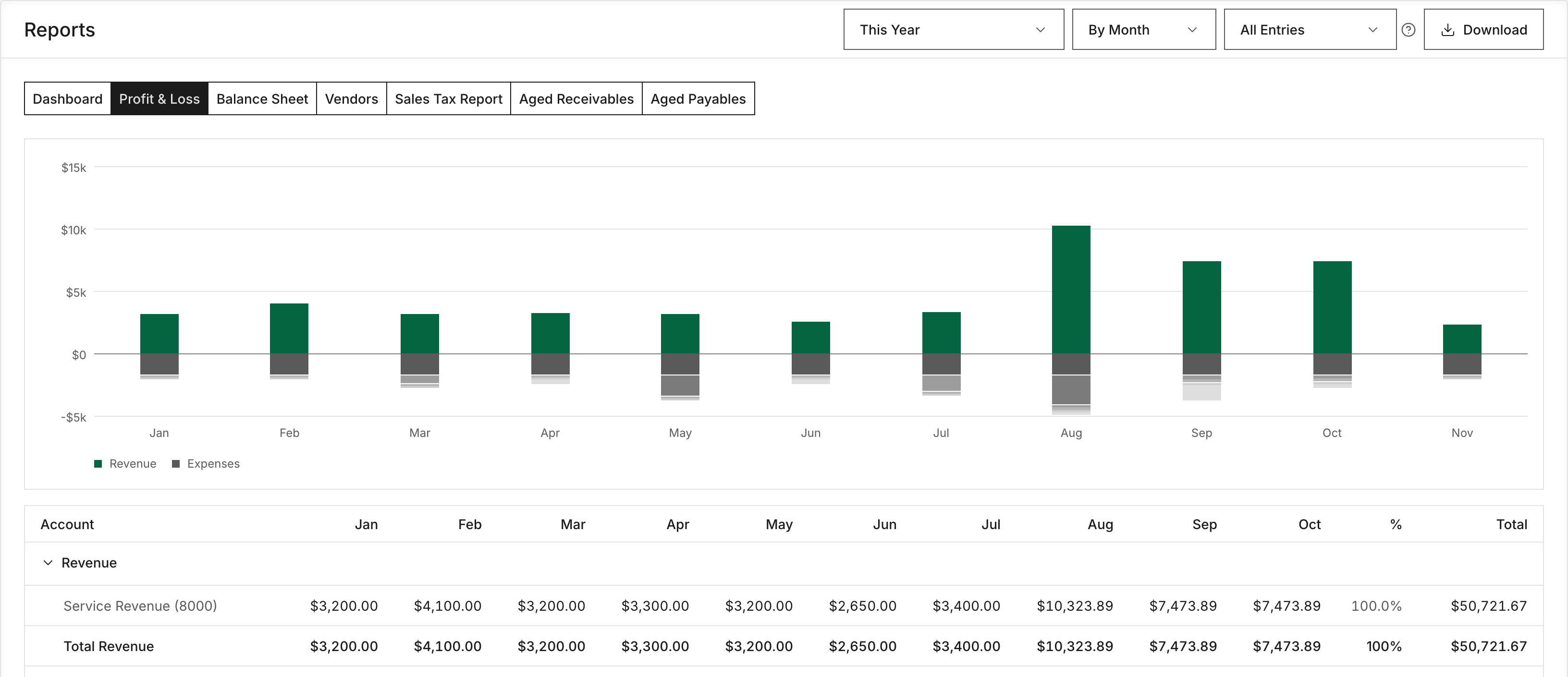
Use the period menu at the top. Choose This Month, This Quarter, This Year, Last 12 Months or Last Year. For anything else, choose Custom Range… and set From and To. Solarium remembers your choice.
Next to it, pick By Month or By Quarter to split the Dashboard, Profit & Loss and Vendors reports into columns.
3. Read The Dashboard
The Dashboard shows Revenue, Expenses and Net Income for the period, a Spending card, and a Revenue vs Expenses chart. It’s the quick check.
4. Read The Profit & Loss
Profit & Loss shows your income and expenses by account, with Gross Profit and Net Income at the bottom. Click any number to see the entries behind it. From that list, Open In Transactions takes you to them in Transactions.
5. Check The Balance Sheet
Balance Sheet shows what the business owns and owes as of the end date you picked. To compare, use the menu beside it: Vs Previous Month End, Vs Previous Quarter End or Vs A Year Earlier. Solarium adds a Change column.
6. See Who You Pay And Who Owes You
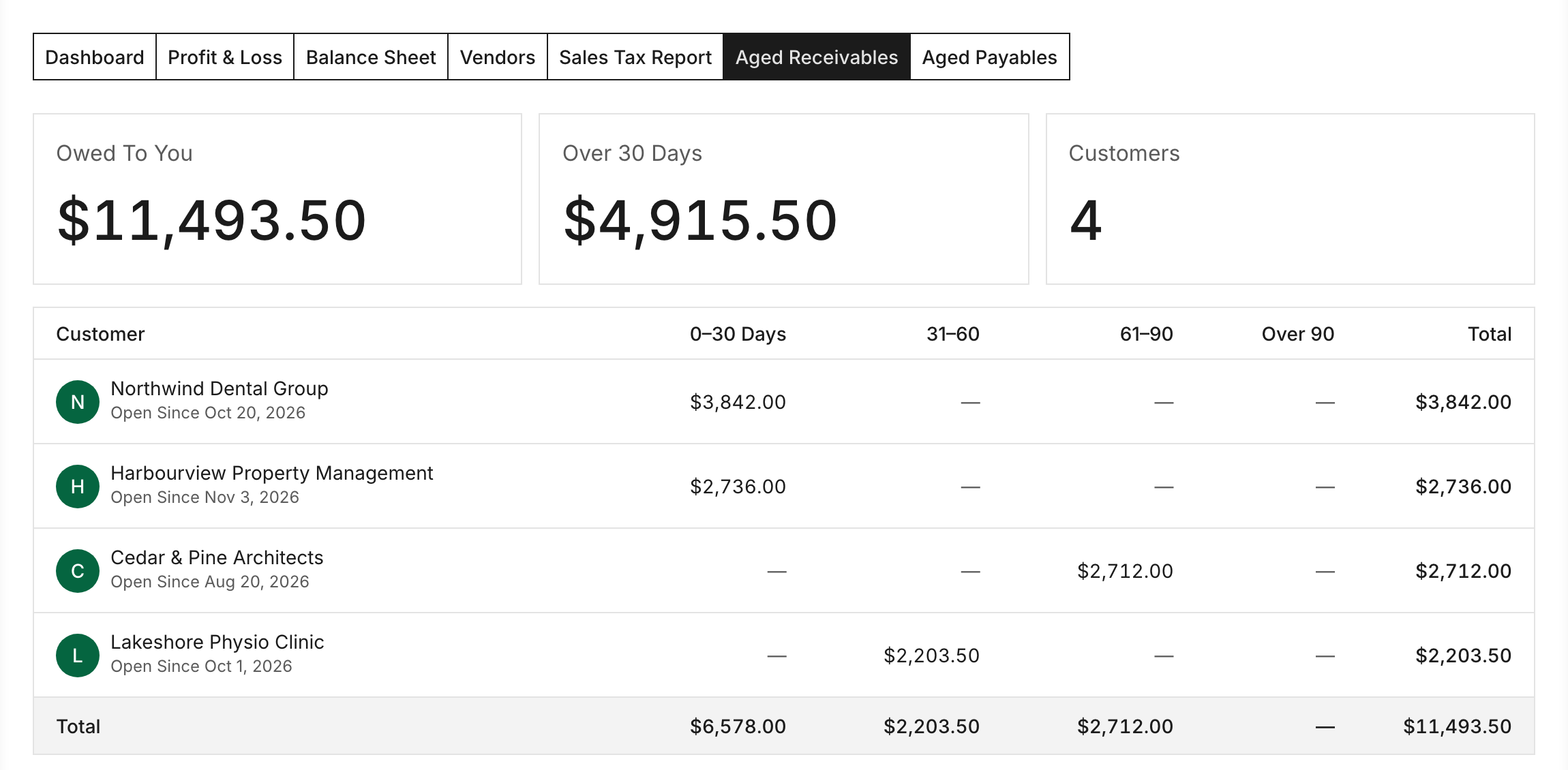
Vendors ranks your spending by vendor, with Top Vendors up top. Aged Receivables shows what each customer owes you, split into columns by how late it is. Riio Systems Inc. looks at the Over 30 Days total to decide who to call. If a customer has invoices in Solarium, clicking them opens their invoices. Aged Payables does the same for what you owe vendors.
7. Download For Your Accountant
Click Download. Pick the Excel option to get every report for the period in one workbook. Pick the CSV option to get just the report you’re looking at. Both match what’s on screen.
What Happens Next
Your reports update as you book. Each confirmed transaction, sent invoice and recorded payment shows up the next time you open Reports. If you use QuickBooks Online, your QuickBooks activity comes in with the nightly sync.
For your sales tax, see Prepare Your GST/HST Return. To keep one-off or personal costs out of your day-to-day numbers, see Use The Management View.
Troubleshooting
- “No Data For This Period.” or “No Revenue Or Expenses In This Period.” Nothing is booked in those dates yet. Widen the range or confirm your review items.
- “These Books Don’t Balance.” Something was posted one-sided. Ask the Solarium team to take a look.
- “Couldn’t Build The File. Try Again.” The download failed. Try again in a moment, or pick a shorter range.
- A line shows “Showing The First 500 Entries.” The list is capped at 500, but the total still counts every entry. Narrow the dates to see them all.
Ask Your AI
Every report is in both Claude and ChatGPT once you’ve connected Solarium. Your AI reads the same numbers you see.
- “What was my net income last quarter, and what were my three biggest expenses?”
- “Who owes me money over 30 days?”
- “Compare my spending by vendor this year to last year.”
Common Questions
Why Doesn't A Transaction Show On My Reports? +
Reports count booked entries. A transaction still waiting in Review isn't on them yet. Confirm it and it shows up.
Are Solarium's Reports Cash Or Accrual? +
Accrual. A sent invoice counts as sales on its issue date, not when the customer pays, and what customers still owe shows on Aged Receivables. Solarium doesn't offer cash-basis reports.
Can I Send My Reports To My Accountant? +
Yes. Click Download and pick the Excel file. It holds every report for the dates you picked in one workbook. You can also invite your accountant to see the books in Solarium.
What Does It Mean If My Balance Sheet Doesn't Balance? +
Solarium shows a These Books Don't Balance warning when something was posted on one side only. Message the Solarium team and we'll take a look.